
This guide explains why an Endpoint Device may appear “Offline” in the GreaseCloud Dashboard and outlines steps to identify and resolve the issue.
HOW “OFFLINE” STATUS WORKS
Endpoint Devices are viewed as a part of a Group, and assigned to an asset. The GreaseCloud Dashboard Asset View shows the Endpoints Connectivity Status as either “Online” or “Offline”
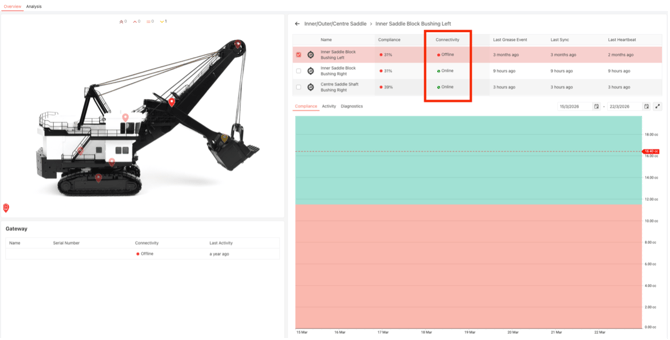
An Endpoint is marked Offline when it has not synced with the Gateway within the configured Inactivity Timeout.
The “Inactivity Timeout” set to each Endpoint can be viewed in the Health Tab.
- Default timeout: 10,080 minutes (7days)
- This value can be adjusted by contacting GreaseBoss Support.
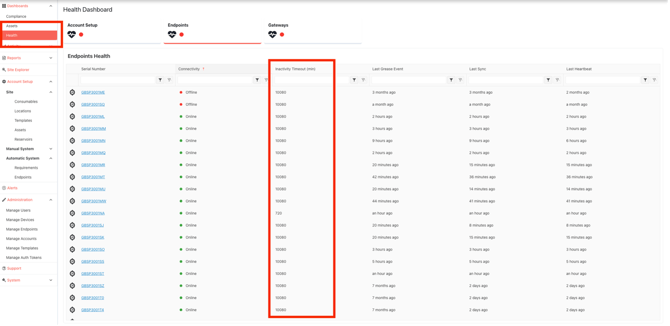
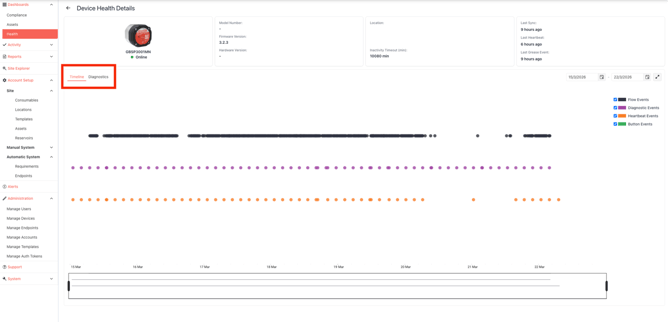
Selecting an Endpoint Device in the Health Tab will display the Device Health Details. There are tabs to view the Timeline or Diagnostics.
Yellow Dots in the Timeline indicate when an Endpoint has synced to the Gateway.
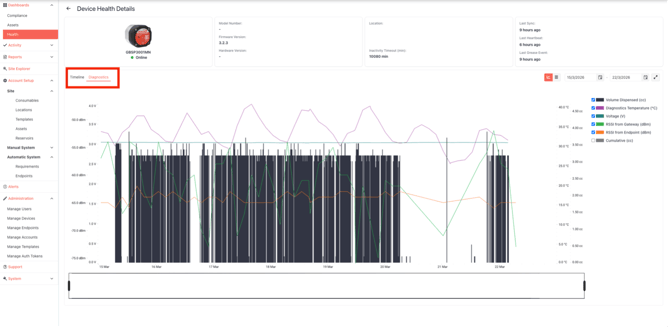
In the Diagnostics Tab, the RSSI line in the graph indicates the time that the Endpoint has Synced to the Gateway, as well as the signal strength of the connection.
The Voltage line in the graph indicates the voltage measure of the battery in the Endpoint.
ENDPOINT DEVICE “OFFLINE”
If an Endpoint Device is displaying Offline, follow the below steps for items to be checked and confirmed.
CONFIRM SCOPE OF ISSUE
Are ALL Endpoint devices on the asset also showing “Offline” for the same or similar period?
YES > Likely Gateway / Asset Issue
Possible Causes:
- Asset is powered down
- Gateway has no power
- Antenna disconnected or damaged
- Gateway hardware fault
- Network Fault
- GreaseCloud Data processing delay / fault
Actions:
- Confirm the status of the Asset
- Check Gateway:
- Power connected
- Antenna securely connected
- LED indicator lights on
- Inspect antenna and cabling for damage
- If site uses a GreaseNode with the site OT Network, contact site OT Network Engineer to confirm Network Status.
- Contact GreaseBoss Support if unresolved.
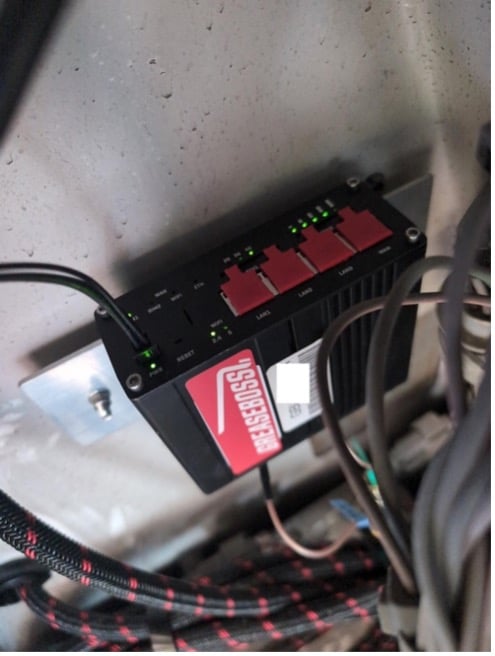 |
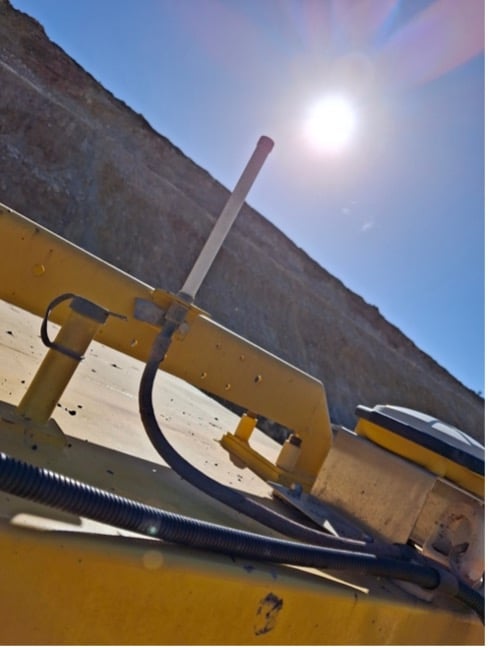 |
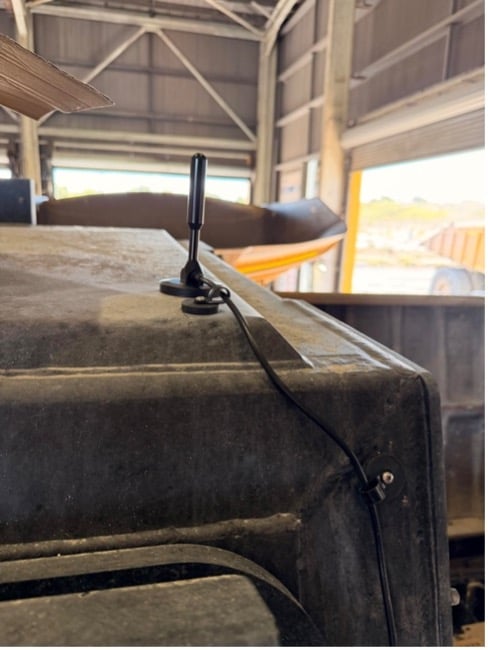 |
|
Confirm Power to Gateway |
Confirm integrity of BLE Antenna |
Confirm Integrity of LTE Antenna |
CONFIRM SCOPE OF ISSUE
Are ALL Endpoint devices on the asset also showing “Offline” for the same or similar period?
NO > Individual Endpoint(s) Issue
Possible Causes:
- Weak Signal from Endpoint to Gateway
- Battery depleted
- Device Fault or Physically Damaged
- GreaseCloud Data processing delay / fault
Actions:
Step 1 - Check Endpoint Device Health in GreaseCloud
- Check Device Health Timeline for long gaps between sync events (Yellow Heartbeats)
- Identify if issue is recent or ongoing
- Check Device Diagnostics for RSSI Signal Strength.
- >-80 dBm – OK
- < -80dBm – Weak
- Check Endpoint Battery Voltage Diagnostic data. If the voltage data line is smooth and stable then the battery could be ok. If the volatage data line displays regular downward spikes in voltage levels, increasing in frequency, then battery is depleating.
Step 2 – Physical Inspection
- Check Endpoint Device condition (damage, mounting, environment, etc.)
- Ensure no obstructions affecting signal and connectivity
Step 3 – Battery Check and Force Re-Sync
- For battery Check, press and hold button on Endpoint Device for 1 second, then release
- Observe LED:
- LED Flashes – Battery OK
- No LED Flash – Battery likely depleted
- To Force Re-sync (Ensure Gateway Is Powered)
- Press and hold button for duration as per instructions in below guide
- Release button and Observe LED sequence as per instructions in below guide
- Observe LED:
Low Flow 300 / High Flow 300 Sync Guide
Bulk Flow / MP2 / Low Flow 400 / High Flow 400 Sync Guide
Step 4 – Confirm Resolution
- Check GreaseCloud Dashboard for connectivity status and data update (may take 10-20mins to update)
- Verify new data is being received.
SYMPTOM/CAUSE REFERENCE
|
Symptom |
Likely Cause |
Suggested Action |
|
All endpoints offline |
· Gateway power issue · LTE or BLE Antenna issue · Network issue · GreaseCloud data issue |
· Confirm status of Gateway and Antenna Hardware · Confirm status of Network with Site OT Eng or GreaseBoss |
|
One endpoint constant offline |
· Battery depleted · Signal/Connection to Gateway issue · GreaseCloud Data issue |
· Check Endpoint Data and Diagnostics in GreaseCloud Dashboard · Perform Physical Inspection of Endpoint Device · Perform Battery Check and/or Re-sync · Replace Battery or Endpoint if required |
|
One Endpoint intermittent offline |
· Weak RSSI · Depleting battery |
· Check Endpoint Data and Diagnostics in GreaseCloud Dashboard · Perform Physical Inspection of Endpoint Device · Replace Battery or Endpoint if required |
|
No diagnostics data |
· Device fault |
· Replace Battery or Endpoint if required · Contact GreaseBoss |
STILL NOT WORKING
Contact GreaseBoss Support with:
- Asset Name
- Endpoint Serial Number
- Description of issue
- Screenshots of Dashboard and/or Pictures of Endpoints (if Possible)
email: support@greaseboss.com.au