
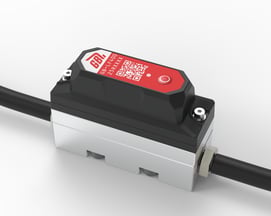
This installation guide provides instructions on how to install the Low Flow LF400 ENDPOINT in line with an automatic lubrication system.
These instructions as well as installation QA processes are available via the Hindsite App. Contact GreaseBoss Support for details.
> Link to a Downloadable PDF Here
|
1: ENSURE ALL DEVICES AND POWER SOURCES TO THE GREASE PUMP AND GREASE SYSTEM ARE FULLY ISOLATED PRIOR TO COMMENCING WORK |
|
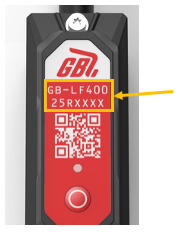
| (Please take photos of each part of the installation to provide back to GreaseBoss to enable effective support. Include a photo of the GreaseBoss Endpoint Serial Number.) | |
|
2: CHECK ENDPOINT-TO-GATEWAY COMMUNICATION RANGE. Prior to installation, check that the Endpoint is within range of the GreaseBoss Gateway and perform a test sync. |
|
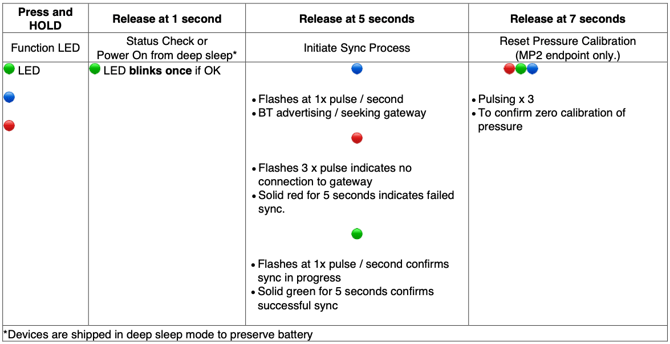
| 2.1: Button Push & LED Sequence Guide | |
|
|
| 2.2: Connect power to the Gateway and allow 5 minutes for it to boot up. Confirm the Endpoint is on by pressing the button for 1 second and releasing and confirming a short green LED blink. | |
| 2.3: Hold or place the Endpoint in position where it is planned to be installed. | |
| 2.4: Press and hold the button on the Endpoint for 5 seconds and release to force a sync with the Gateway. Follow the LED sequence as shown in 2.1 and confirm a solid green LED indicating successful sync. | |
| 2.5: Repeat steps 2.3. and 2.4 with each Endpoint to be installed. | |
|
Troubleshooting & Improvement Options If not in range or intermittent, try the following options to improve the connection:
|
|
| 3: ENDPOINT INSTALLATION PROCESS | |
|
Parts & Tools |
Included in kit:
User supplied:
|
|
3.1: Record the Endpoint Serial Number and Grease Point (Serial Number: GBLF4#########) |
|
|
3.2: Install Endpoint Inline |
|
|
3.3: Check Endpoint Connectivity |
|
|
3.4: Check Endpoint Data in the GreaseBoss Cloud |
Once a grease event has occurred (e.g. when the asset / lubrication system has been returned to service), check that data is visible in the GreaseBoss Cloud account. |
