
Manage Users
Add/Remove Users:
Users with Account Admin permissions are able to add and remove users from the GreaseCloud Account Dashboards they have access to.
To add a New User:- Log in to the GreaseCloud Dashboard.
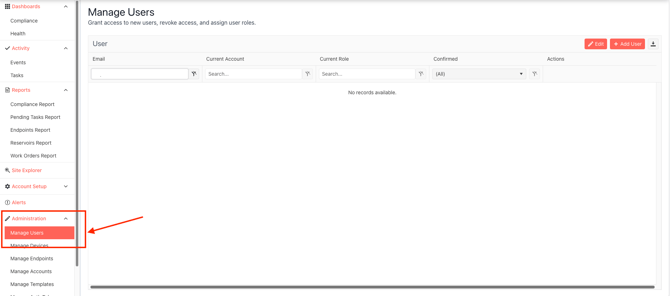
- Navigate to "Administration"
-
Select "Manage Users"
-
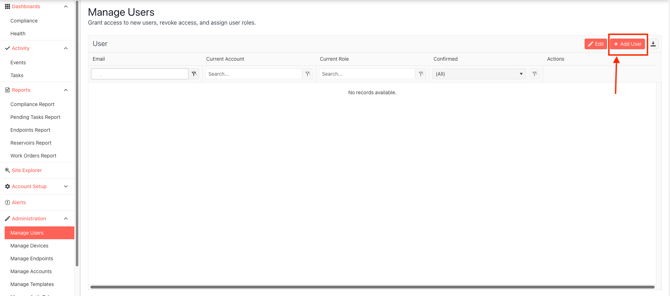
Select "Add User"
-
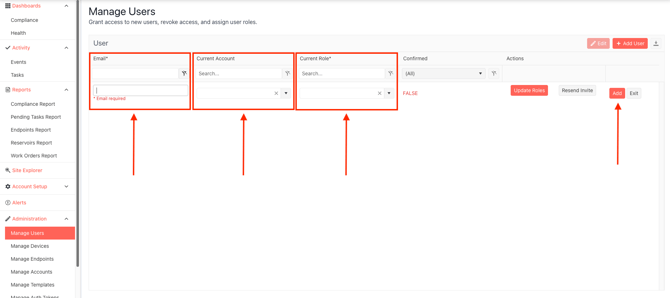
Add the email address of the new user, select the account they will be associated to (applicable if the Account Admin has access to more than one GreaseCloud Account), and select the new users permission levels in "Current Role".
-
For more information about user permissions, see this article: Manage Users: User Access & Permissions Explained - Site Admins
-
-
-
An email will be sent to the email address filled in for the new user. This email will include details and a link to complete their User Profile and set their password. The link is only active for 24hours and will expires after this time.
-