This installation guide provides instructions on how to install the MP2 ENDPOINT in line with an automatic lubrication system.
> Link to a Downloadable PDF Here
|
1: ENSURE ALL DEVICES AND POWER SOURCES TO THE GREASE PUMP AND GREASE SYSTEM ARE FULLY ISOLATED PRIOR TO COMMENCING WORK |
|
|
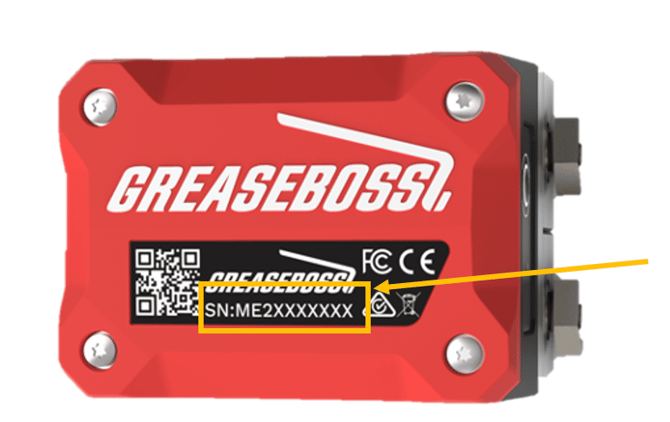
(Please take photos of each installation step and provide to GreaseBoss for effective support. Include a photo of the GreaseBoss Endpoint Serial Number.) |

|
2: CHECK ENDPOINT-TO-GATEWAY COMMUNICATION RANGE. Prior to installation, check that the Endpoint is within range of the GreaseBoss Gateway and perform a test sync. |
|
|
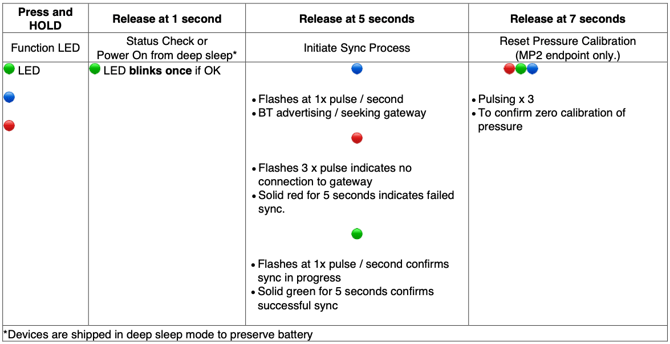
2.1: Button Push & LED Sequence Guide |
|
|
|
|
|
2.2: Connect power to the Gateway and allow 3 minutes for it to boot up. Confirm the Endpoint is on by pressing the button for 1 second and confirming a short green LED blink. |
|
|
2.3: Hold or place the Endpoint in position where it is planned to be installed. |
|
|
2.4: Press and hold the button on the Endpoint for 5 seconds and release to force a sync with the Gateway. Follow the LED sequence as shown in 2.1 and confirm a solid green LED indicating successful sync. |
|
|
2.5: Repeat steps 2.3. and 2.4 with each Endpoint to be installed. |
|
|
Troubleshooting & Improvement Options If not in range or intermittent, try the following options to improve the connection: · Check Gateway is on · Attempt sync 3 times · Change the Endpoint mounting location · Change the Gateway location · Check Endpoint battery level (contact GreaseCloud User or GreaseBoss Support to check) · Increase Endpoint power and re-try step 2 (contact GreaseBoss Support to enable this) · Could anything else be interfering with the signal / is an additional gateway required |
|
|
3: ENDPOINT INSTALLATION PROCESS |
|
|
Parts & Tools
Parts & Tools (Cont) |
Included in kit: · Endpoint MP2 · Note: 1/4” BSPP female thread on Endpoint · Magnetic mount if selected at time of purchase
User supplied: · Mounting bolts with washers and nuts · Fittings and hoses as required · Custom mounting bracket if required |
|
3.1: Record the Endpoint Serial Number, Port Number and Grease Point (Serial Number: GBMP#######) |
· Note there is a small notch on the side of the Endpoint Flow Meter Metal to indicate Port 1 side.
|
|
3.2: Install Endpoint Inline
|
· Ensure lubrication system is off, isolated and de-pressurised, and the GreaseBoss Gateway is installed. · Identify the grease line that is to be monitored by the Endpoint. · Identify a suitable mounting location for the Endpoint. · Ensure the mounting location is clean and smooth, and clear of dirt. · Disconnect the grease line and install the Endpoint using appropriate fittings and hoses. · Ensure no dirt, debris or contaminants enter the Endpoint or are on the Endpoint Female Thread or Hose/Connector Male Thread. · Check hose and connector integrity. · Secure the grease line on either side of the Endpoint. · Recalibrate Pressure readings to Zero. Press and hold button on Endpoint for 7 seconds and release. Coloured lights will cycle. |
|
3.3: Confirm Endpoint Connectivity |
· Ensure the GreaseBoss Gateway is powered on, and automated lubrication is still isolated. · Hold Endpoint button down for 5 seconds and release. · Observe light behaviour pattern - solid green light following flashing lights indicates sync success. (Check other behaviour against the attached image). · Wait two minutes to retry if results are uncertain. |
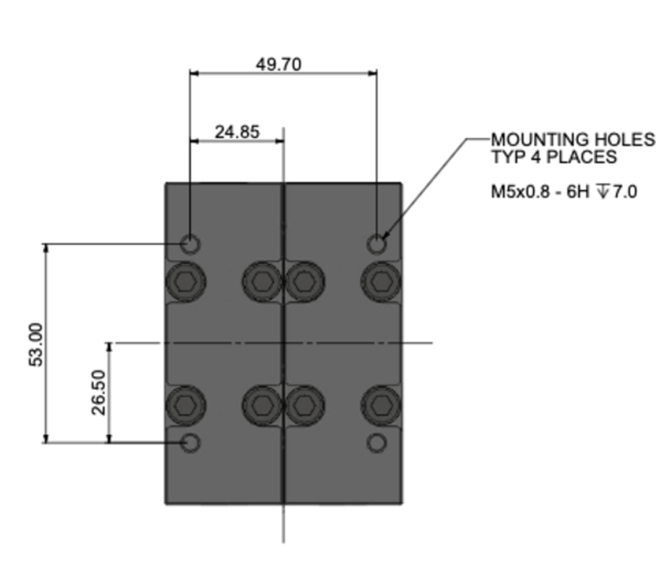
MOUNTING HOLE DIMENSIONS