
HME Gateway – Offline / Not Transmitting to GreaseCloud
Scope: This guide diagnoses a fault in the GreaseBoss HME Gateway or its connection to GreaseCloud — not a fault in the machine it’s fitted to. If the asset is intentionally shut down, in storage, or undergoing maintenance, the Gateway losing power is expected and not a product issue.
For background on how the Gateway connects to GreaseCloud — architecture, backhaul options, Global SIM — see HME Gateway – Information and Data Communications Architecture Options.
DIAGNOSTIC STEPS
Step 1 — Confirm it’s actually the Gateway
- In GreaseCloud: Dashboards > Health > Gateways. Or: Dashboards > Assets > select the asset > Gateway panel, bottom-left of the Overview tab — scoped to just this asset’s Gateway. Find this Gateway’s serial number.
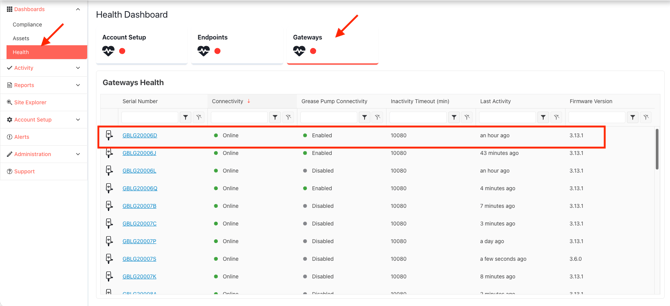
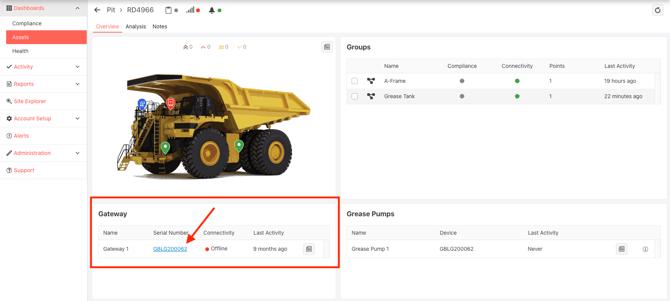
- Connectivity = Offline → Gateway-level issue confirmed. Note the Last Activity time, then continue to Step 2 — even if Endpoints on this asset still look fine (see note below).
- Connectivity = Online, but Endpoint(s) on the asset still show offline → not a Gateway issue. Use Endpoints Status "Offline" in GreaseCloud instead.
- If a Pump Monitor Wire Harness is fitted, the Health > Gateways row also shows a Grease Pump Connectivity column (Enabled/Disabled) — this is separate from the Gateway’s own connectivity and doesn’t indicate a fault by itself.
Note: Endpoints can sync via a different asset’s Gateway, so Gateway and Endpoint status don’t confirm each other. Fix an Offline Gateway regardless — it still means lost redundancy and (if fitted) lost Pump Monitor data.
Step 2 — Confirm the asset is operating
- Asset shut down / parked / in maintenance → expected, not a fault. No action needed; Gateway reconnects once powered on.
- Asset operating → continue to Step 3.
Step 3 — Confirm Gateway power
- Check the PWR LED (lit = 12V power present).
- Lit → Step 4.
- Not lit:
- Confirm power source to the Gateway is live (ignition/accessory circuit).
- Check the 12V Deutsch plug is fully seated.
- If a Pump Monitor Wire Harness is fitted: check its junction box Power LED (red = power present) and Pump LED (green = pump active), and the harness connections to the Grease Pump Controller and its power source (ignition, 24V UPS, or another on-asset supply, depending on the install).
- Power confirmed present, still no PWR LED → Gateway hardware fault. Go to “Still Not Working.”
Step 4 — Confirm the backhaul
- 4G/LTE SIM (Global SIM): confirm the deployment country is covered — 1global.com/enterprise/coverage. Not covered → arrange a customer-supplied local SIM instead; no amount of antenna/signal checking will fix this.
- 4G/LTE SIM (public carrier — covered Global SIM, or customer-supplied): check LTE antenna connection; check signal at the install location (a mobile phone call test on the same network is a reasonable proxy); confirm SIM data plan is active.
- Private site LTE, Wi-Fi, Site Network (VPN), or Private Cloud: confirm with site IT/OT that nothing’s changed — network path, firewall rules, VPN status. Note: a phone call test doesn’t work as a signal proxy on a private LTE network. See Common Questions from IT Departments.
Step 5 — Confirm resolution
- Recheck Dashboards > Health > Gateways (or Dashboards > Assets > [asset] > Gateway panel) for this serial number: Connectivity should show Online, with a recent Last Activity time.
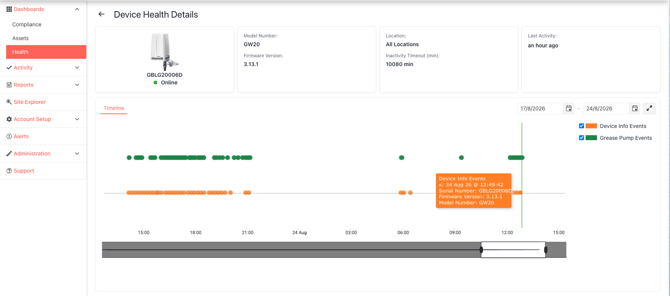
- For the exact sync history, click the serial number to open the Timeline — orange dots (Device Info Events) are Gateway-to-cloud sync events; if a Pump Monitor Wire Harness is fitted, green dots (Grease Pump Events) show pump activity separately. Hover a dot for its date and time.
- Online with recent activity → resolved.
- Still Offline after 10–20 min → go to “Still Not Working.”
SYMPTOM / LIKELY CAUSE / SUGGESTED ACTION
|
Symptom |
Likely Cause |
Suggested Action |
|
Gateway shows Online in Dashboards > Health, but an Endpoint is offline |
Individual Endpoint issue, not a Gateway fault |
|
|
Gateway shows Offline in Dashboards > Health, but its Endpoints still look fine |
Endpoints are likely relaying via a different, nearby Gateway (Endpoints aren’t locked to one Gateway) |
Still fix this Gateway — lost redundancy and, if fitted, lost Pump Monitor data. Continue from Step 2 regardless of Endpoint status |
|
PWR LED off, asset is powered on |
No power reaching Gateway; loose Deutsch plug; harness fault |
Check power source, Deutsch plug, and (if fitted) Pump Monitor Wire Harness junction box Power LED |
|
PWR LED on, but Gateway still Offline in Dashboards > Health |
Backhaul issue (weak/no SIM signal, expired data plan, site network/VPN/firewall change) |
Check LTE antenna and signal strength, or confirm with site IT/OT that network path hasn’t changed |
|
Gateway in a country with no covered carrier for the Global SIM |
Global SIM has no local network to roam onto in that country |
Check 1global.com/enterprise/coverage; if not covered, arrange a customer-supplied local SIM instead |
|
Power confirmed OK, still Offline, site uses a private LTE network |
Private network issue, not a public signal issue |
Confirm with site IT/OT — a phone call test doesn’t apply here |
|
Everything checks out physically, still Offline after 20 min |
GreaseCloud data processing delay, or fault not yet isolated |
Recheck Dashboards > Health > Gateways once more before escalating |
|
Asset intentionally shut down |
Expected — not a fault |
No action needed; Gateway reconnects once asset is powered on |
STILL NOT WORKING
Contact GreaseBoss Support with:
- Asset name
- Gateway serial number
- Backhaul type in use (4G/LTE SIM — Global SIM or customer-supplied, private site LTE, Wi-Fi, VPN, Private Cloud) and deployment country
- Description of what’s been checked so far
- Screenshot of the Gateway’s row in Dashboards > Health > Gateways (or the asset’s Gateway panel), and/or its Timeline
- Photo of the Gateway and LTE antenna, and (if fitted) Pump Monitor Wire Harness junction box, if possible
Email: support@greaseboss.com.au
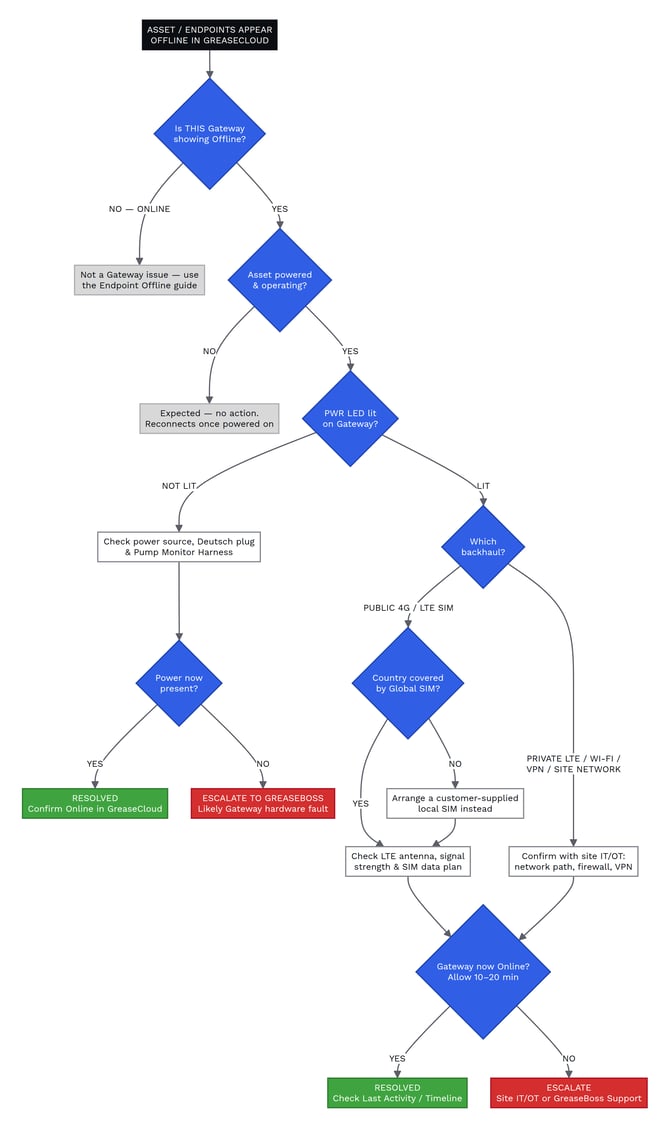
DIAGNOSTIC FLOW CHART
RELATED ARTICLES
- HME Gateway – Information
- HME Gateway Installation Procedure – Mobile Equipment
- Pump Monitor Wire Harness Installation Guide
- HME Gateway – Spec Sheet
- Data Communications Architecture Options – Automatic Grease Monitoring System
- Common Questions from IT Departments
- Endpoints Status "Offline" in GreaseCloud
- GreaseCloud Dashboard Troubleshooting
- Global SIM Coverage (external — 1GLOBAL)